
Windowing
The following changes were made to windowing.
Additional Supported Windows
The following windows are now supported in Window Layouts and Multi-Windows
• Water Accounts Manager
• Priority-oriented Optimization Solution Analysis Tool (POSAT)
• Supplies Manager
• DMI Manager
• Dataset Manager
• Name Map Manager
For more information, see Supported Window Types in User Interface.
See the important note in Window Layouts - DMI Editors are No Longer Supported for windows that are no longer supported in the Window Manager.
Multi-Window Includes Model Name
The Multi-Window now includes the model name in the title bar.
See Multi-Windows in User Interface for more information on the Multi-Window.
Multi-Window Tabs Name Improvements
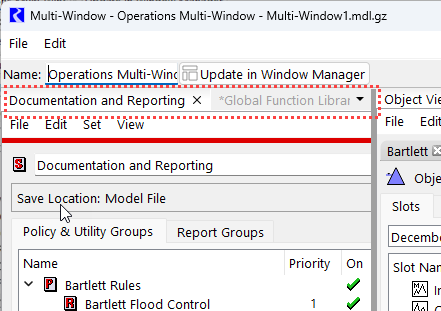
In a Multi-Window, you can rearrange windows to create a tabbed view. Previously, the tabs were given the name of the window and then elided if they did not fit. This made the text hard to read. Now, the tab titles are not elided, but many of the longer window text has been shortened. For example, in the image below, the title of the RPL set was “RBS Ruleset Editor - Documentation and Reporting” but in the Multi-Window it is now called the user-specified set name: “Documentation and Reporting”.
Figure 1.20 Multi-Window with New Tabbed Text Highlighted
See Combining Windows in a Tabbed View in User Interface for more information.
Window Layout Export
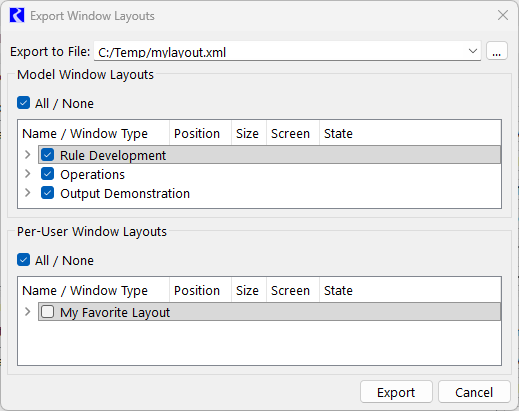
When exporting window layouts, you can now select the window layouts you would like to export. Previously, you could only export all window layouts. Now you can select one or more layouts to export. Further, you can select Model Window Layout or Per-User Window Layouts. When imported, the layouts will import as either model or per-user. See the screenshot below.
Figure 1.21 Export Window Layouts
For more information, see Exporting and Importing Window Layouts in User Interface.
Revised: 01/09/2026