
Multiple Run Management
The following changes were made to Multiple Run Management.
Distributed MRM Diagnostics File Extension
Distributed MRM writes a diagnostics file for each parallel RiverWare instance to the Distributed MRM Working Directory. These files provide the contents viewed in the Diagnostics windows that can be opened from the Distributed MRM Controller. The file extension for these diagnostics files has been changed from .log to .txt. For example, the file name is now rw_001_<username>.txt. Note that if you access these files directly, such as with an external script, you will now need to search for .txt files rather than .log. Otherwise no user changes are required.
This change was made to support recent enhancements for viewing MRM diagnostics in the RiverSMART user interface.
Export / Import Configurations
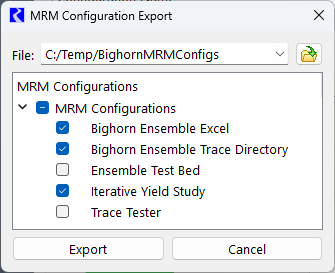
MRM was enhanced to support export and import of MRM configuration using the same import/export framework that is used for DMIs. This new functionality makes it easier to share MRM configurations from one model to another model. A screenshot of the new export configuration window is shown below.
Figure 1.8 MRM Configuration Export Window
Export Object Attributes at Start of MRM run
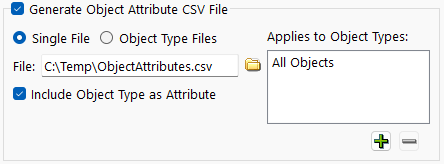
The MRM configuration now includes controls for exporting Object Attributes as CSV. See a screenshot below and Export Attributes as CSV. When configured, the object attributes are exported at the beginning of an MRM run. During a distributed MRM run, the attributes are exported once per overall MRM run, not per run in a distributed run.
Figure 1.9 MRM Controls to Generate Object Attribute CSV File
This option is also available for a RiverSMART scenario. The exported CSV files are in the scenario’s output folder. See the RiverSMART documentation for more information.
Grouping and Ordering Configurations
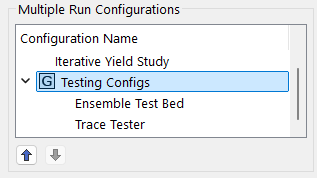
MRM configurations can now be grouped and reordered in the Multiple Run Control window. See a screenshot in the figure below. This allows for improved organization and appearance of MRM configurations. The ordering and grouping are saved in the model file.
Figure 1.10 MRM Configurations with new Grouping and Ordering Controls
For more information, see Reordering and Grouping Configurations in Solution Approaches.
Revised: 01/09/2026