
Special Attention Notes and Known Issues
The section describes special attention notes that indicate changes in functionality that require you to update models, cause model results to differ, or display a warning message when you first open a model in RiverWare Version 9.8.
If you have any questions, contact RiverWare Support:
RPL Table Lookup Function Changes
Two changes were made to the TableLookup and TableLookupDefaultTol RPL predefined functions. These were fixes for issues RW-7372 and RW-7374.
• RW-7372: When the lookup value (4th argument to the function) was greater than the last value in the “from” column of the lookup table slot but within the lookup tolerance of the last value, it was incorrectly returning the value from the second to last row in the table. Now it correctly treats the value as a match with the last row and returns the appropriate value from the last row.
• RW-7374: When using the round down option (6th argument to the function set to FALSE), if the lookup value was within the tolerance of a value in the “from” column of the lookup table slot but less than the table value, it was incorrectly rounding down to the next row, rather than treating the value as a match as intended. This was inconsistent with the behavior when using the round up option. Now, any lookup value that is within the lookup tolerance of a value in the table in either direction is always treated as a match with the table value.
These modifications to the functions could change model results.
See TableLookup in RiverWare Policy Language (RPL) and TableLookupDefaultTol in RiverWare Policy Language (RPL) for more information on these two RPL functions.
Control File - Executable DMI Reimplementation
Much of the code for the Control File - Executable DMI was refactored, meaning that it was updated for clarity, to make use of more modern coding standards, and to structure the code in a more efficient manner. Other than some potential small performance improvements with the Control File - Executable DMI and some improved warning messages, there should not be any changes to behavior. However, you should test your Control File - Executable DMIs to verify that there are no changes in behavior.
DSS DMI Dataset - HEC-DSS Upgrade
The HEC-DSS library used for the DSS DMI Dataset was upgraded from 7-IQ-11 to 7-JA-7. The updated version, 7-JA-7, does not support DSS V6 files. Previously RiverWare wrote V7 files but could read V6 files. With this upgrade, RiverWare 9.8 and later versions can no longer read V6 files. Please convert all V6 files to V7 using DSS-VUE conversion utilities.
Warnings from Removal of Non-Visible Methods
Many user method categories related to old optimization approximation techniques were removed from the RiverWare code. These categories were not visible in the user interface, and the methods no longer had any effect. Thus, removing the categories and methods has no impact on behavior of existing models. However, when a model is first opened in RiverWare 9.8, many brown warning messages about method categories that do not exist will be issued. This will occur for most models, even those that have never used optimization.
Examples of the type of warning messages that can be expected are shown in Figure 1.1.
Figure 1.1 Sample warning messages about optimization approximation method categories that were removed
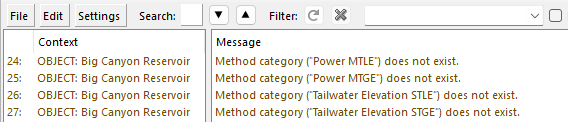
These warning messages can be ignored. Once the model has been saved in RiverWare 9.8 (or a later version), the warning messages will no longer appear.
Pumped Storage Reservoir with Pump Power Inputs
When a Pumped Storage reservoir object was solving with Pump Power as an input, the computed Pump Energy output could be incorrect. This was filed as issue RW-7382 and has been corrected. This could change model results.
Modifications to Rio Grande Accounting Tables
Changes were made to the following Reservoir Account Gain Loss Object-level Accounting Methods that are specific to the Rio Grande basin.
In these methods, several table series slots included pairs of columns with implied units in the column label, for example, “Total Inflow (cfs)” and “Total Inflow (af/d).” In these cases, both columns had a unit type of flow.
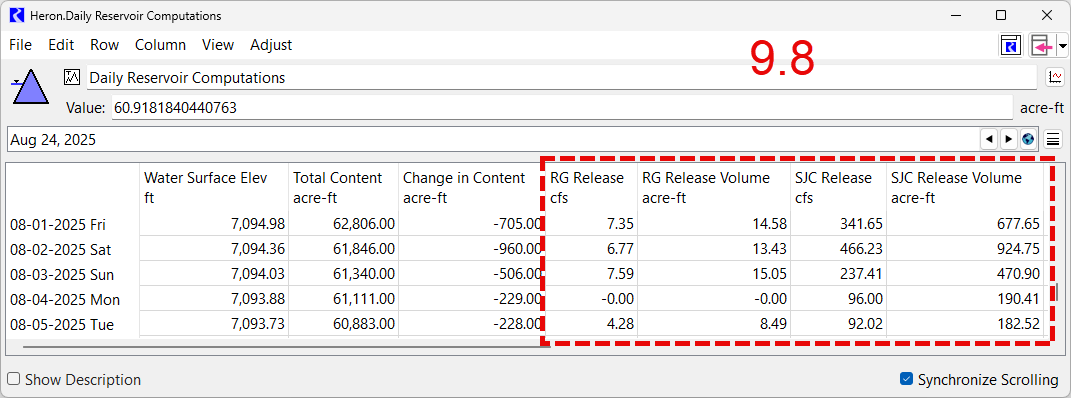
The units were removed from the labels, and “Volume” was added for the label that previously included (af/d), for example, “Total Inflow” and “Total Inflow Volume.” The unit type on the Volume columns was changed to volume as well. An example is shown below.
Figure 1.2 Daily Reservoir Computations slot in RiverWare 9.7.4 with paired Release columns both in units of Flow
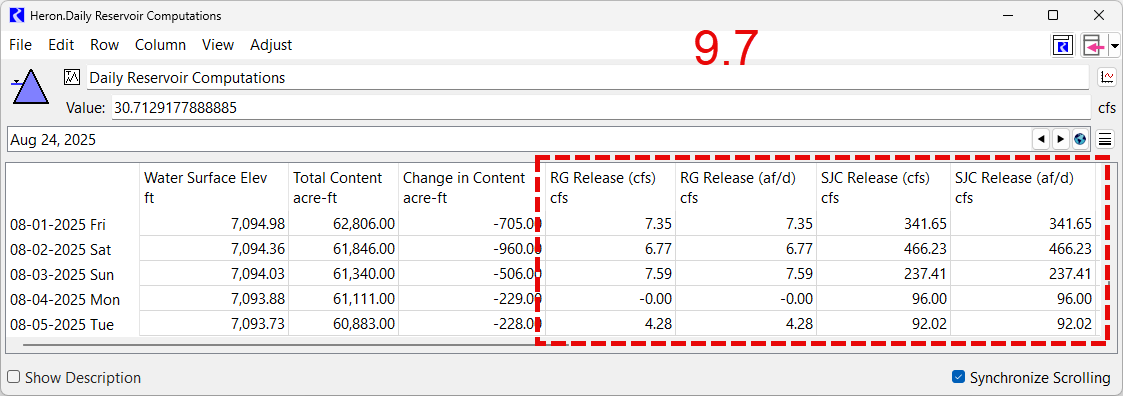
Figure 1.3 Daily Reservoir Computations slot in RiverWare 9.8 with updated column labels and units of Volume in second paired slot
The following table series slots were modified in a similar manner.
• Preliminary Data
• Preliminary Data Totals
• Daily Reservoir Computations
• Daily Reservoir Totals
• Nambe Daily Reservoir Comps
In addition to the changes to column labels and unit types, in the Preliminary Data Totals and Daily Reservoir Totals slots, which report values summed or averaged over each month, flow values were changed to averages (mean) rather than sums.
These changes have the following impacts on existing models:
• The column labels and unit types update as soon as an older model is opened in RiverWare 9.8. However, the model must be run in 9.8 to show the correct values in the Volume columns.
• Also, any RPL logic that references the old column labels, such as in expression slots, must be updated to reference the new column labels and possibly convert units. Otherwise the logic will issue an error in RiverWare 9.8.
See Reservoir Account Gain Loss in Accounting for more information on these methods.
Revised: 11/12/2026