
Data Management Interface (DMI)
The following changes have been made to RiverWare DMI functionality.
DMI Status Window
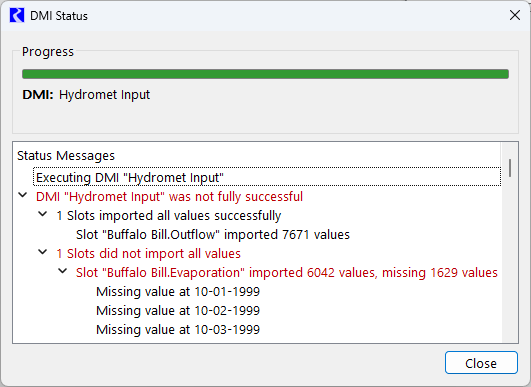
The DMI Status window has been separated from the Confirm Warnings pop-up dialog. Previously, these two were combined in a single modal window, meaning that you had to close the window before accessing any other parts of the user interface. This meant that you could not simultaneously view the status messages or warnings and open and investigate the portions of the model referenced in the messages.
Now the DMI Status window contains the progress bar and status messages. The window is no longer modal, which allows you to simultaneously view the status messages and access the rest of the user interface.
Figure 1.4 DMI Status Window
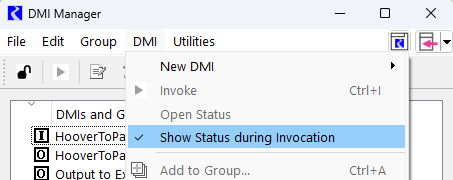
The DMI Status window can be configured to always open when a DMI is invoked by selecting the Show Status during Invocation option from the DMI menu of the DMI Manager, or it can be opened at any time by selecting the Open Status option from the DMI menu of the DMI Manager.
Figure 1.5 Menu option to show DMI status during invocation
See DMI Status in Data Management Interface (DMI) for more information.
The DMI Confirmation pop-up still opens automatically if the Confirm Warnings option for the DMI has been enabled and a warning or error message is issued when the DMI is invoked. It continues to be a modal dialog, meaning that you must close the DMI Confirmation pop-up before proceeding with any other actions in the user interface. Any messages shown in the DMI Confirmation pop-up will also be printed to the DMI Status window and to Diagnostics.
See Warning and Error Messages in Data Management Interface (DMI) for more information.
DSS Dataset - HEC-DSS Upgrade
See the Special Attention note DSS DMI Dataset - HEC-DSS Upgrade.
CDA Web Service Test URL
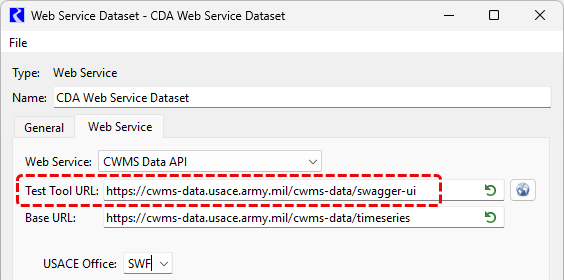
The CWMS Data API dataset was updated to remove the “.html” that was incorrectly included at the end of the Test Tool URL. Existing models that contain the incorrect URL will be automatically updated with the correct URL when opened in RiverWare 9.8 or later versions.
Figure 1.6 CDA Web Service Dataset with updated Test Tool URL
USGS Web Service DMI Updates
The USGS Daily Values Web Service DMI Dataset has been updated to accommodate the USGS Water Data For the Nation (WFDN) Web Service API update from V0 to V1. The URLs for the dataset have been updated from V0 to V1. Existing models with the V0 URLs will be automatically updated with the V1 URLs when opened in RiverWare 9.8 or later versions.
Also, Site Map diagnostics were added for interaction with the web service. The dataset already provided diagnostics for data retrieval. Site Map diagnostics can be helpful in ensuring the correct URLs are being used.
Control File - Executable DMI Reimplementation
See the Special Attention Note Control File - Executable DMI Reimplementation.
Revised: 11/12/2026